Branded product screenshots. Displayed figures are examples; available
actions depend on your configuration and permissions.
More than a billing screen
What does a restaurant POS actually connect?
Distribook Restaurant is a restaurant point-of-sale system that
connects table and takeaway orders, kitchen instructions, bills,
payment records, stock and management reports.
The counter POS, waiter app, owner/admin app and web administration
each give the right person a view of the same restaurant workflow.
For a café in Jaffna, that can mean taking an order on the floor and
checking its bill at the counter. For a larger restaurant in Sri
Lanka, it can mean separate kitchen stations, assigned staff and
branch-level oversight. Start with your service routine, then
configure the tools around it.
One restaurant. Four connected views.
Every role.
In the same rhythm.
Follow a service, from the counter to your pocket.
Less oil. No chilli. A dish to take away. Keep the request attached to the right item, send the intended kitchen changes and follow preparation progress.
A visual menu, a clear order and the next action where you need it.
Work in light or dark appearance without changing how the restaurant
runs.
Choose a view
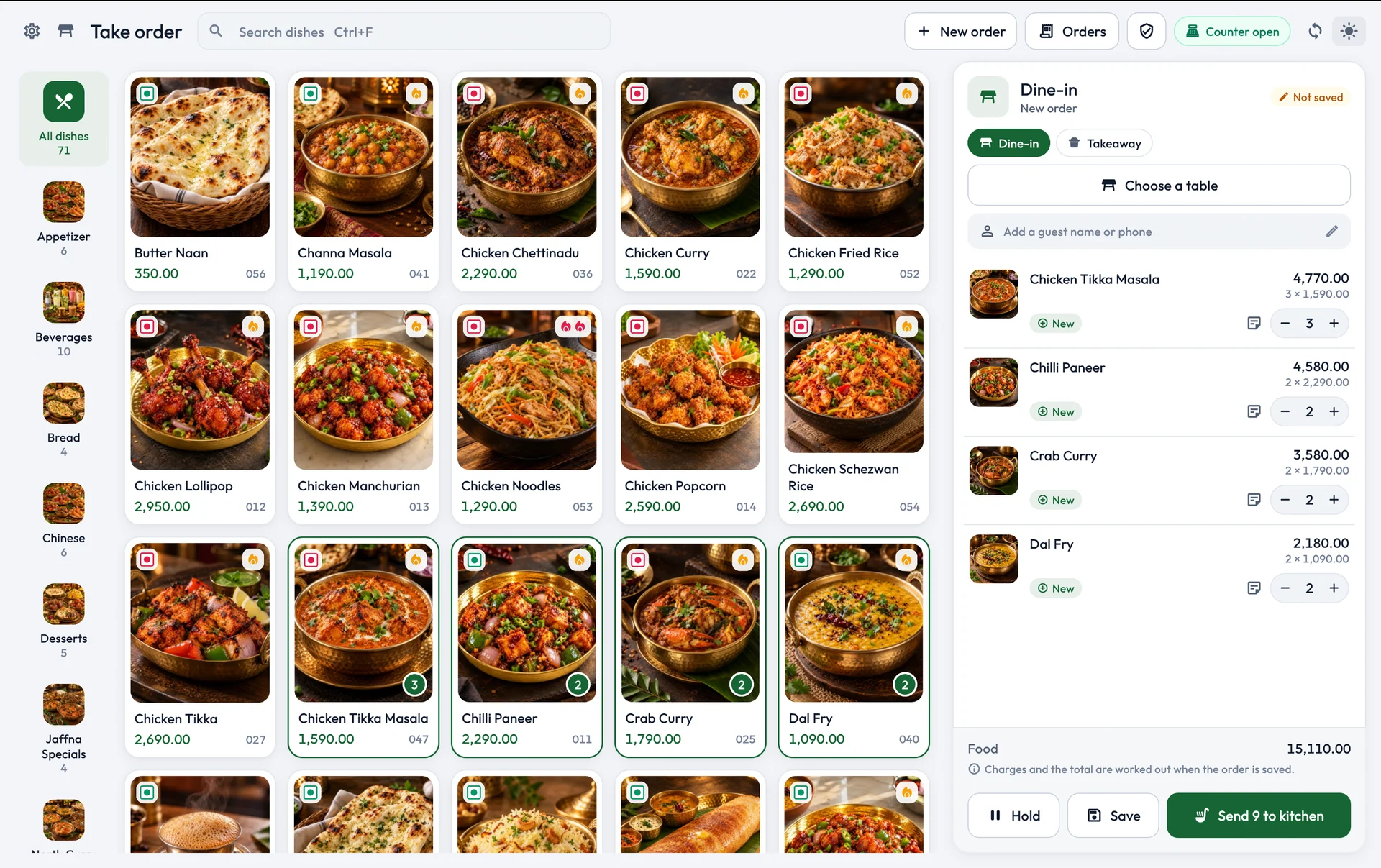
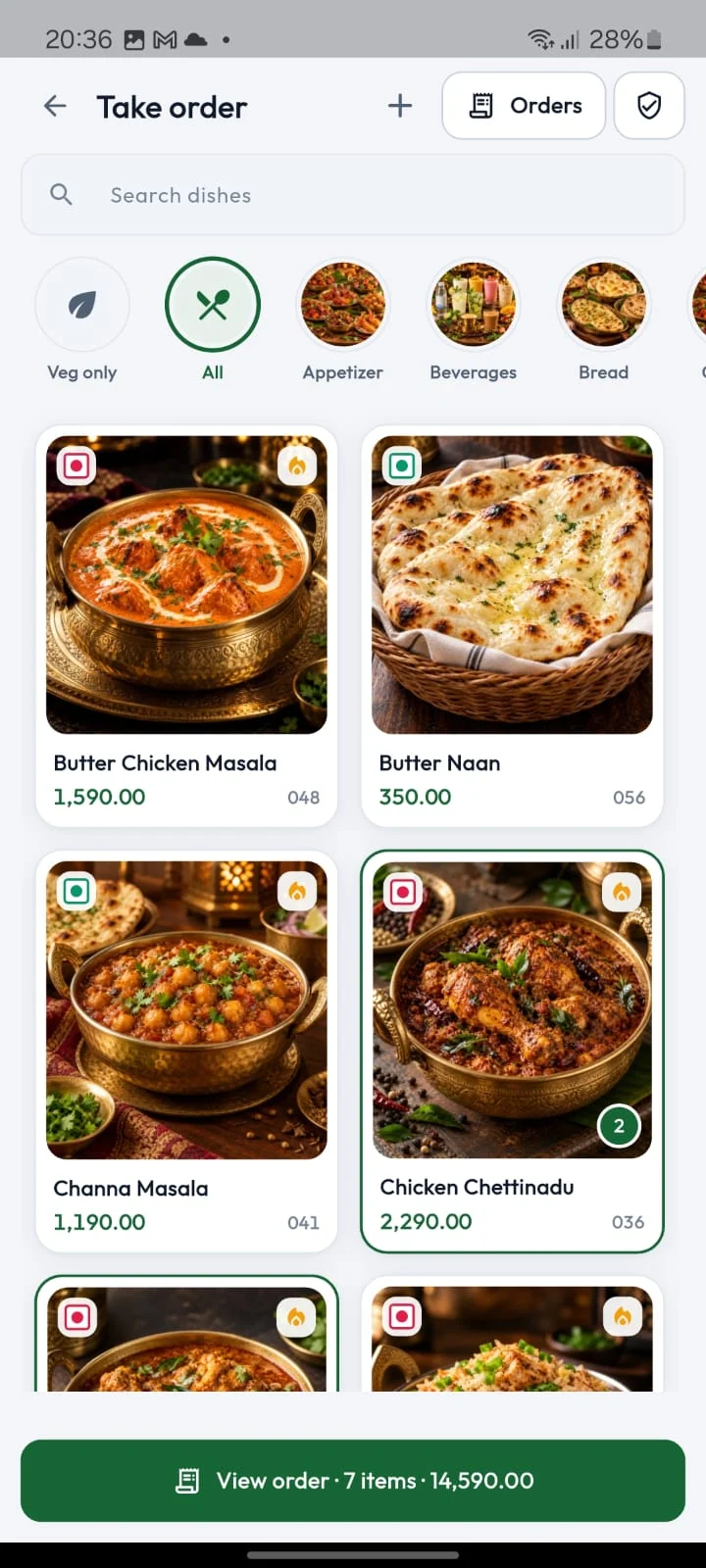
The restaurant order workspace / Light
View screen ↗
Browse dishes, select the service context and check the order before
saving or sending it.
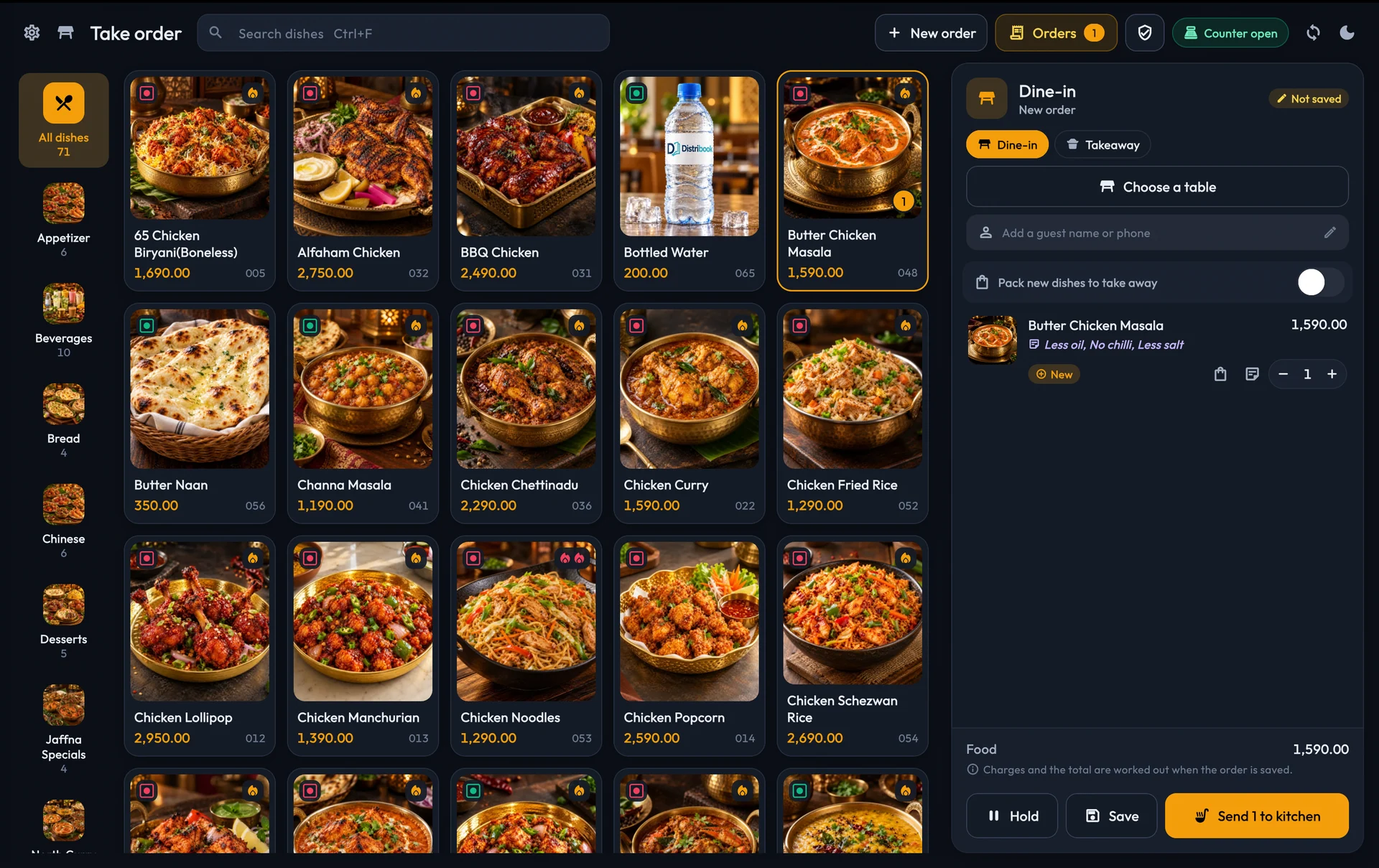
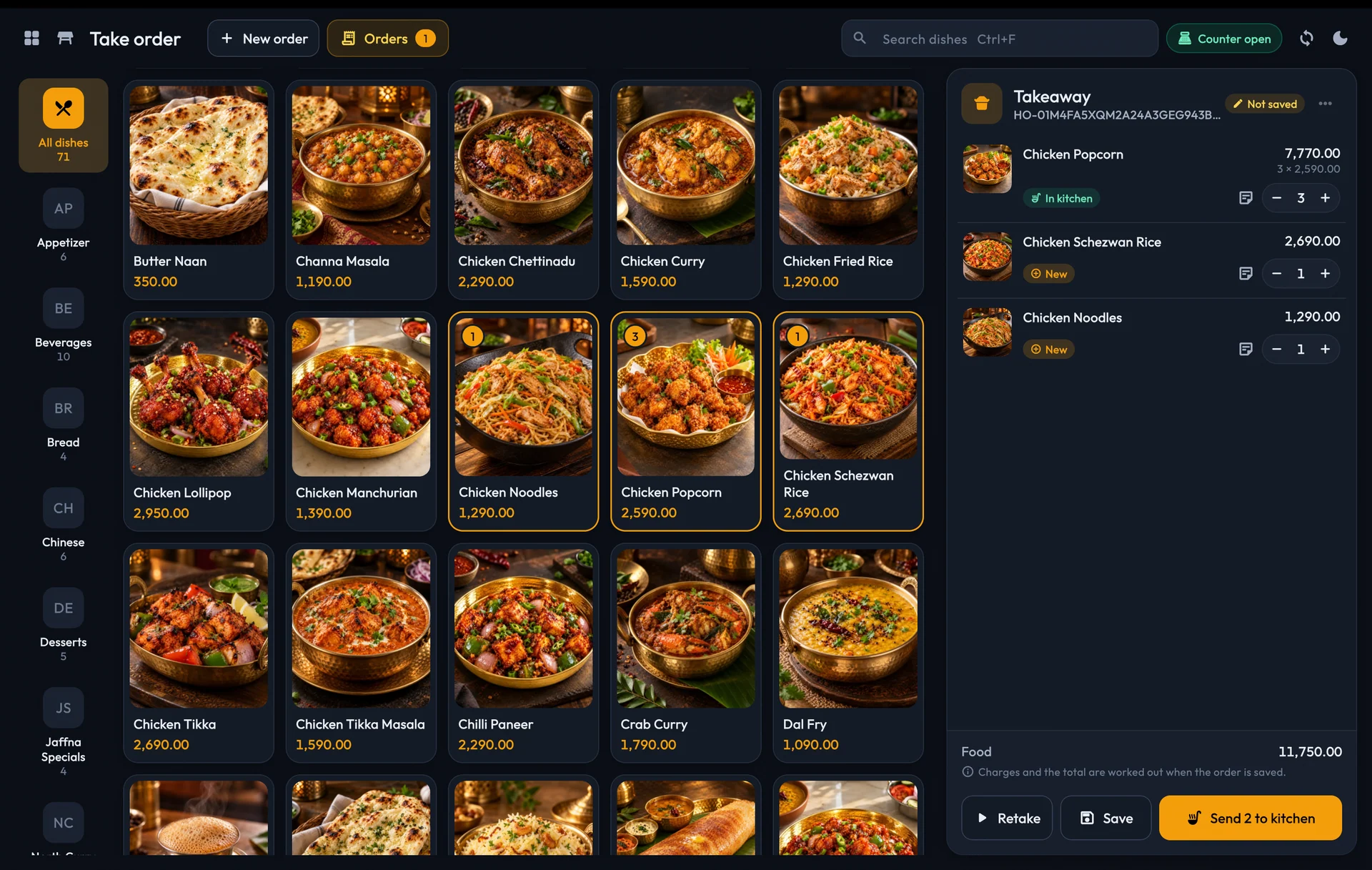
The restaurant order workspace / Dark
View screen ↗
The same restaurant workflow in dark appearance, with dish status
and totals kept visible.
A menu staff can recognise.
Use product photographs, categories and search to find the intended
dish. Check quantities, prices and the order type before moving on.
Dine-in and takeaway stay identifiable instead of becoming a
collection of anonymous bills.
Menu details belong in one maintained catalogue. Configured add-ons,
included sides and recipe information help the counter and floor
work from the same choices. Review the final total when a selection
changes the price.
Instructions attached to the dish.
A preparation note such as “less oil” belongs beside the item it
describes. It should remain clear when the kitchen prepares several
similar dishes. Keep quantity changes, takeaway packing and
preparation progress in the context of the actual order.
Keep a guest’s request close to the dish, even as more items join
the order. Your team can check the same context when taking an
order, preparing the food and bringing it to the table.
View screen ↗
Preparation notes stay with the selected dish.
Kitchen clarity
Send the change.
Keep the whole order clear.
An extra drink or a later dessert should stay part of the same
service. Send the intended changes to the kitchen and keep the
order’s preparation progress in view.
Kitchen preparation and ticket-printing status stay distinct, so the
team can understand what needs attention. The kitchen guide covers
station handoff, printing and safe reprints.
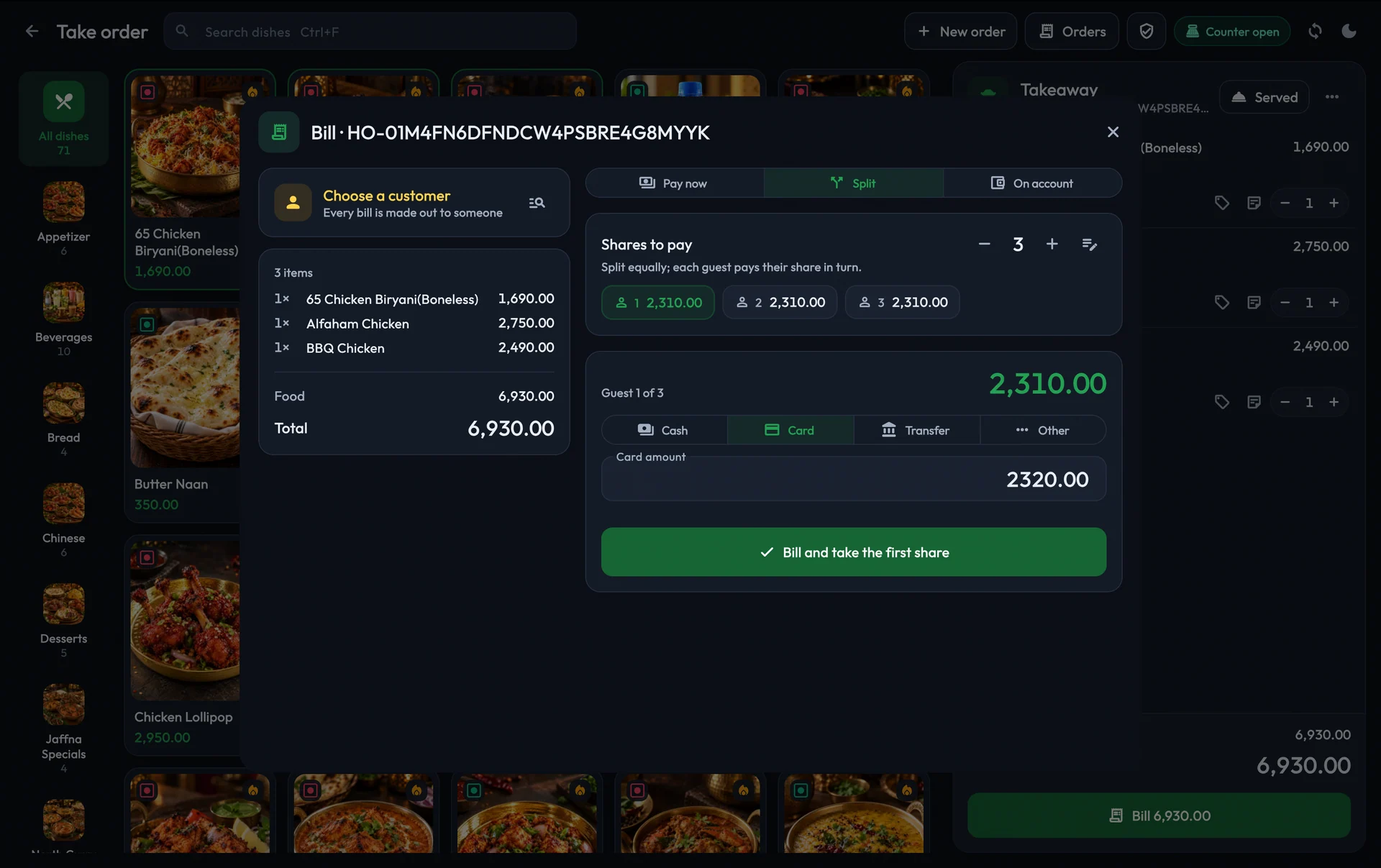
One table. Several guests. Let the cashier review each share and
keep the remaining balance clear. Record cash, card, transfer or
other configured methods against the right bill.
See the food total, discounts, service charge and configured taxes
together before confirming. If you need a payment-terminal or
gateway integration, the team will review that separately during
setup.
View screen ↗
Review the guest share and record the payment that was actually
made.
02 / On the floor. In your pocket.
The right view
for each person.
Give the floor a clearer next step, and give management the bigger
picture.
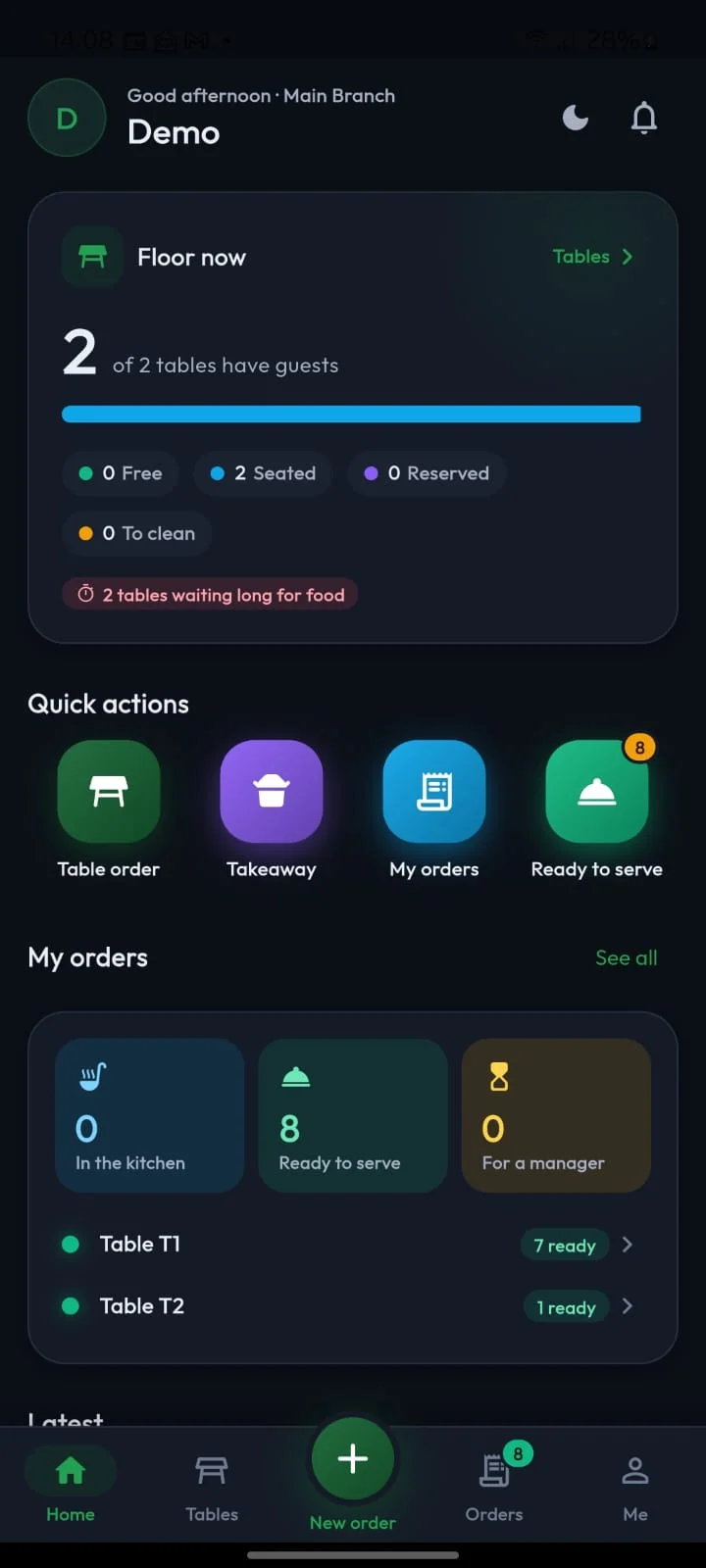
Waiter app
Stay with the guest.
Stay close to the kitchen.
See the floor overview, open a table, browse the menu and take the
order from the floor. The waiter view brings table context and
dish progress together, including the items ready to serve.
Staff can check what is in the kitchen and what needs attention
without treating every order as a new counter transaction. The
controls shown depend on enabled features and the authenticated
person's access.
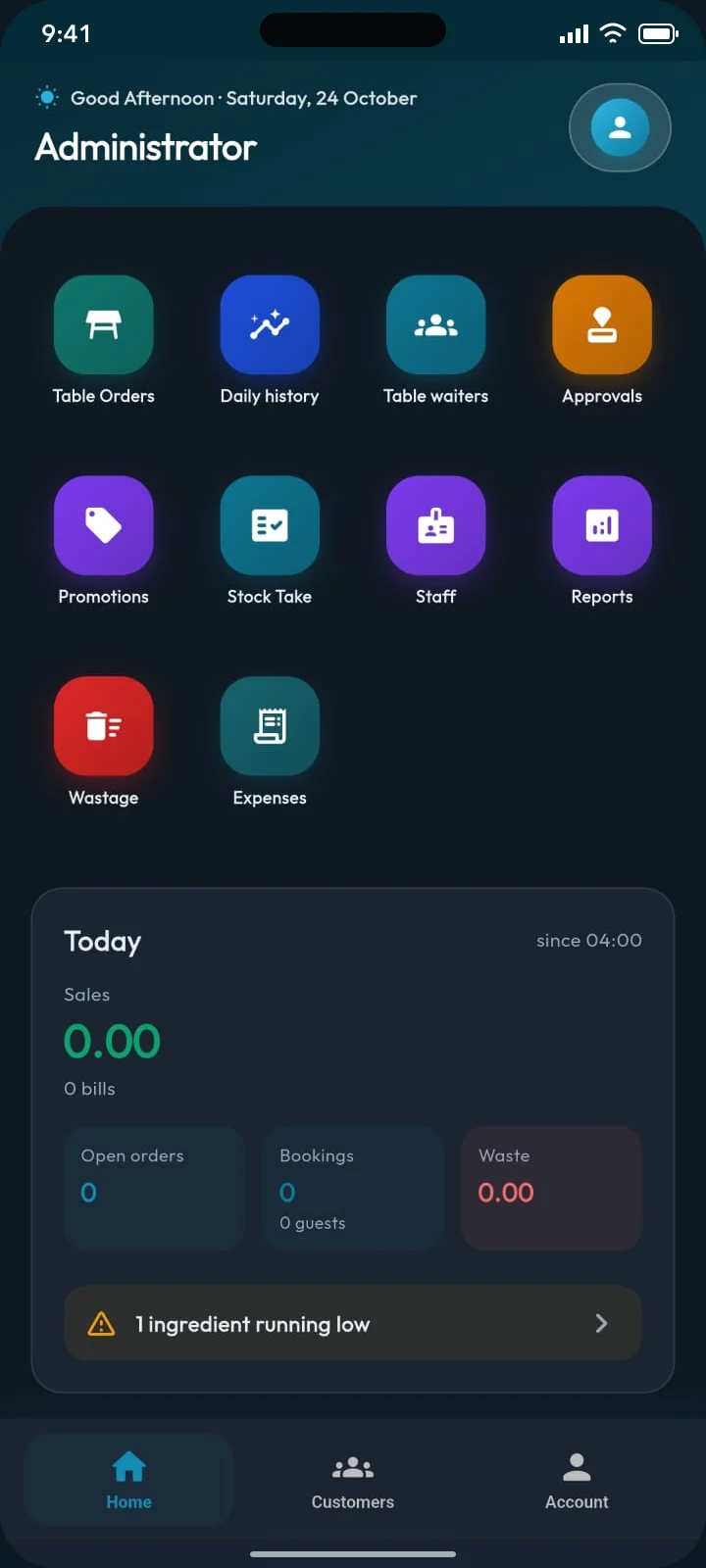
A closer view of business.
Even when you are away.
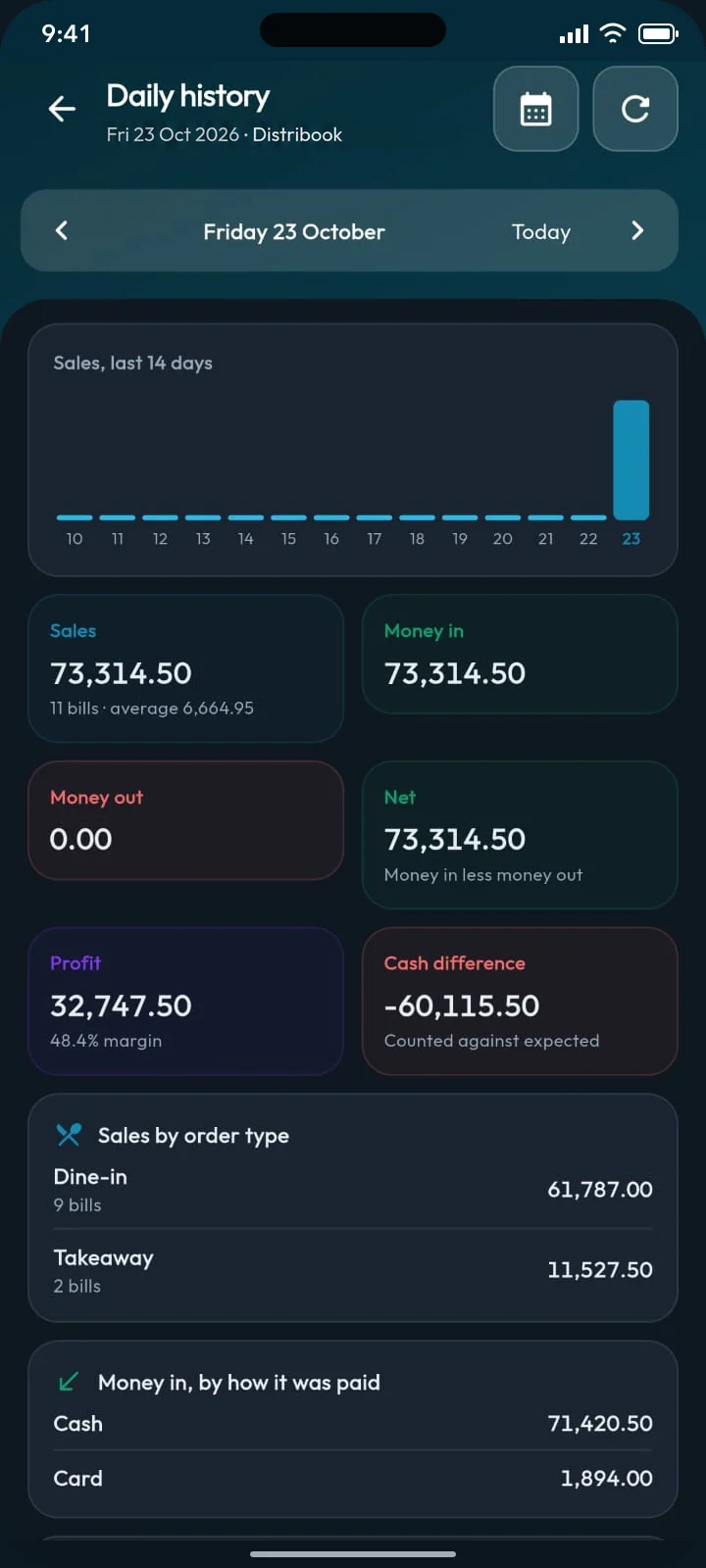
Review the day, previous results, table orders, menu prices, stock
and staff from the admin app. Open the reports and permitted
approvals that match your responsibilities instead of giving every
account the same controls.
Assigned branches and stores keep the view in context. Language,
restaurant colour and light/dark appearance help the apps fit the
people using them; the underlying operational records remain the
focus.
Connect what you sell with how you prepare it, where you keep it and
what management needs to review.
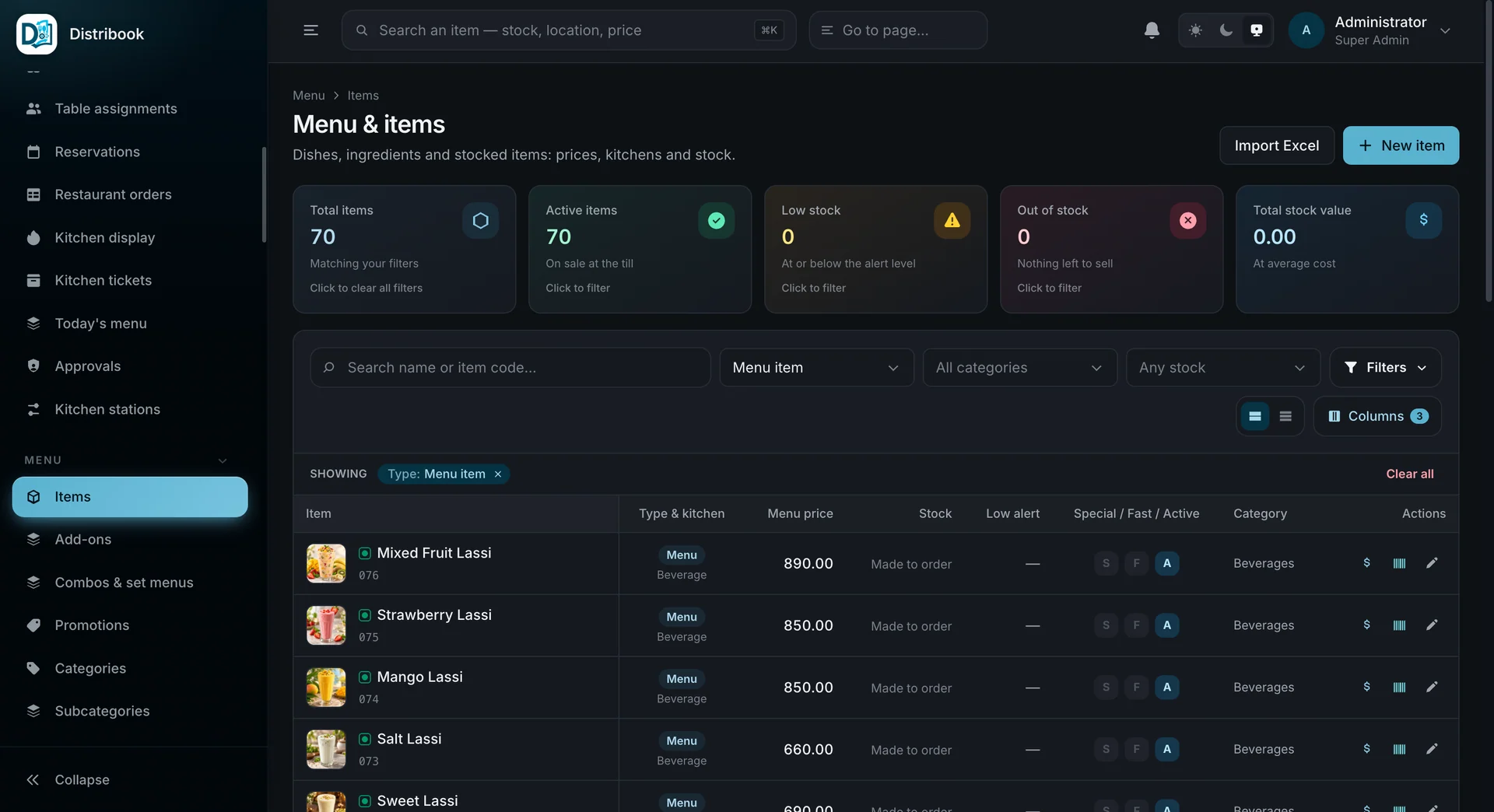
Distribook / Web administration
View screen ↗
Maintain dishes, ingredients and stocked items in the administration
workspace.
Prices and kitchen setup
Give dine-in, takeaway and delivery their configured prices.
Maintain preparation information, menu choices and kitchen stations
beside the product, with your tax and service-charge rules in
context.
Stock with context
Look beyond the menu price. Follow ingredients through receiving,
stores, transfers, counts and wastage using your enabled stock
tools. Recipes and prepared batches connect the dishes you sell with
the ingredients behind them.
The day explained
Bring sales, payment records, expenses and business-day reports into
one review. Compare what was expected with what was counted, look
back at previous days and give the next shift a clearer handover.
Distribook is a product of
SiTechra (Pvt) Ltd,
based in Jaffna. Speak to the team about the way your restaurant
serves, the language your staff prefer and the tools already at your
counter.
Arrange a demonstration around a real service: open a table, add
dishes, send a preparation note, settle a guest share and review
the day. Discuss Tamil, Sinhala or English, existing data and
staff training. A practical walkthrough is more useful than
choosing from a feature list alone.
Start with your country, operating currency, receipt requirements,
taxes, time zone and support expectations. Agree the restaurant
configuration and test the intended device and printer workflow
before rollout. International deployment should fit the local
business rather than assume every country's rules are identical.
These are the published platform plans. Get a written restaurant
quotation that confirms the applications, counters, kitchen stations,
equipment and onboarding you need.
The counter & administration
Admin + POS
LKR 3,000
/ month
The published base plan for POS and web administration, inventory, sales, purchasing and business reports.
Waiter access, kitchen equipment, printers and any country-specific
requirements are confirmed in your quotation. Published international
business setup:
USD 250
one-time.
Straight answers for comparing systems, planning your setup and bringing the team onto one workflow.
What is a restaurant POS system?
A restaurant point-of-sale system connects menu items, table or takeaway orders, kitchen instructions, bills and payment records. Distribook Restaurant adds a waiter app, an owner/admin app and web administration so the floor, counter and management work with the same restaurant records.
Is Distribook available for restaurants in Jaffna?
Yes. Distribook is a product of SiTechra (Pvt) Ltd, based in Jaffna, Sri Lanka. Contact the team for a restaurant demonstration, configuration review and quotation. Discuss your tables, counters, kitchen stations, devices and training needs before deciding on a setup.
Can I use the restaurant POS outside Sri Lanka?
International businesses can discuss a Distribook deployment with the team. Confirm the operating currency, tax and service-charge rules, receipt requirements, time zone, devices, printers and support arrangements for your country. The published international business setup fee is USD 250; the complete restaurant quotation depends on the agreed scope.
How do the POS, waiter app and owner app work together?
The POS supports counter orders and billing. Waiters use their app to view tables, take orders and follow kitchen progress. Owners and managers use the admin app to review sales, orders, stock, staff and permitted approvals. Each account sees the capabilities, branches and stores it is allowed to use.
Can guests split a bill or use different payment methods?
The restaurant payment workflow supports guest shares and configured payment methods. The cashier reviews the order, customer, share amount and remaining balance, records the actual payment method, and checks the saved result. Recording a card or transfer payment is distinct from operating a payment terminal or gateway; confirm any integration separately.
Does the kitchen receive dish notes and order changes?
Staff can add preparation notes to a dish and use Send to kitchen for the relevant order changes. Kitchen preparation and ticket-printing status are separate. If printing is uncertain, check the printer and existing ticket before requesting a reprint; sending another food order can create a duplicate instruction.
What does the restaurant system cost?
The published Admin + POS plan is LKR 3,000 per month, and Admin + POS + Mobile App is LKR 3,500 per month. These are published platform plans. Ask for a written restaurant quotation confirming waiter access, counters, kitchen stations, hardware, onboarding and any international setup before ordering.
Which languages and appearance options are available?
Distribook provides English, Tamil and Sinhala interface options, and the restaurant apps support light or dark appearance. Restaurant guides are available in all three languages. Confirm the preferred language and the exact counter and mobile-device setup during your demonstration.
Will it work with my existing printers or without the internet?
Compatibility depends on the device, printer connection, kitchen-station setup and workflow. Review your receipt and kitchen printers, network and connectivity requirements with the team, and test the intended workflow before launch. Do not assume every printer, device or operation has the same offline behaviour.
Bring your restaurant into the conversation
Let’s walk through
your next service.
Tell us your country, tables, counters and kitchen setup. We will help
you review the restaurant workflow and prepare a quotation around the
scope you actually need.